Thursday, January 29, 2009

Xkcd is a badly drawn, must read webcomic that'll change the World wide web

Title : Steal this comic

Caption: "I spent more time trying to get an audible.com audio book playing than it took to listen to the book. I have lost every other piece of DRM-locked music I have paid for."

Xkcd.Com is a webcomic which has built up a huge fan following on the net.

It's drawn with stick figures and all the fun lies in the dialogue and the alt or title text.

Www.Xkcd.Com

Tuesday, January 20, 2009

Sarah the cyborg ate a violin


If you don't know the story of how Sarah the cyborg ate a violin, then know this. Sarah, plain and tall and a cyborg was trying out underwater Linux. She wanted to to know the difference between a passenger-side bidet and a driver-side bidet. Normal furries would have googled for it. But Sarah, unlike normal furries, thought that people are too civil on the internet. So she said "Frankly, my dear, I don’t give a frack". And ate a violin made of chocolate.

Phrases courtesy xkcd, pic from some cooking site

Tuesday, December 16, 2008

The Tales of Beedle the Bard - rocks the charts


Here is a list of top-ten selling fiction books in Canada (for the week ending Dec. 9 from Amazon.ca)

FICTION
1 (1) The Tales of Beedle the Bard - J.K. Rowling (hardcover)
2 (4) Twilight - Stephenie Meyer (paperback)
3 (8) Eclipse - Stephenie Meyer (hardcover)
4 (5) New Moon - Stephenie Meyer (paperback)
5 (3) Through Black Spruce - Joseph Boyden (hardcover)
6 (10) Breaking Dawn - Stephenie Meyer (hardcover)
7 (7) Book of Negroes - Lawrence Hill (paperback)
8 (9) The Shack - William Paul Young (paperback)
9 (-) The Tales of Beedle the Bard (Collector's Edition) - J.K. Rowling (hardcover)
10 (-) The White Tiger - Aravind Adiga (paperback)


And we see that The Tales of Beedle the Bard is at both the first and the ninth places in the charts. Even split over two different editions (the normal hardcover and the Collectors' editions) it is truly rocking the charts.

Saturday, August 30, 2008

Get free comics about money - and also some free shredded money

Wanted to get some money absolutely free ?

If you want to teach school kids about money, the story of how it evolved and the current banking systems of the USA, here is your chance.

Free comic books about money snail mailed to your address absolutely free. And then, maybe one day you'll get an email offering you free money for filling out a small survey on how you used the comic books.

Get free comics about money - and also some free shredded money.

This offer is from the Federal Reserve System - New York.

Here is the link

http://www.newyorkfed.org/publications/result.cfm?comics=1


Don't forget to read the online comics too.

Wednesday, August 06, 2008


Wanted to browse for pictures or photos on the internet in a more beautiful way ? If you have Firefox on Windows, there is the PicLens CoolIris addon. Which I uber cool. A 3d wall of pictures which you can scroll across.

Here is a website which gives another cool way to browse pictures.

Also visit fundazone.com Tag Galaxy (http://www.taggalaxy.de/)

Search for pictures online with tags and see everything like a galaxy of planets.

Friday, July 18, 2008

Batpod - 2 wheeler batmoto for the Dark Knight is not an iPod


Batman had a really cool car tank in Batman Begins. The cops couldn't even begin to describe it as they tried to alert that a black ... tank thingie was speeding.
It's called the Tumbler, by the way. Built for making temporary bridges during war.

Now that the new Batman movie "The Dark Knight" has been released, wouldn't you want to see what's new.

Here it is - the BatPod.

Its not anything like the iPod - the BatPod doesn't play mp3 or shuffle. But it also doesn't require iTunes.

Its an awesome bike that comes out as an escape(? does the batman need to escape) pod from theTumbler (the tank thingie)

Susan Carpenter of the Times described the bike with "engines [in] the hubs of each wheel... there are shields that fit each arm like sleeves and have the ability to rotate around the bike's frame. The two foot pegs are set 3 1/2 feet apart on either side of the tank, which the rider lies on, belly down."

If you have noticed, whenever batman needs more control or to shoot from his Tank thingie (Tumbler), he slides into the front part, belly down. This is exactly how he rides the BatPod.
Not the iPod !
Besides his extreme wealth and dedication to wiping out mob crime in Gotham, there's nothing super about Bruce Wayne—and that might make him the most gear-loaded superhero of all time. Although it's not Caped Crusader style to resort to guns (modded goggles and body armor get more screen time in The Dark Knight), you have to fight fire with fire when The Joker's packing heat. So the Bat-Pod joins the legion of gun-toting movie motorcycles with .50-cal. machine guns and 40 mm cannons built directly into its framework. Then the bike one-ups them with its pneumatically launched grappling hooks, which flip an 18-wheeler over in one key shootout.

Sunday, June 15, 2008

Sachin the Great - predicts cricket with logic - Aamir won't tell us the secret !

Who said this ?

"Shahrukh is licking my feet and I am feeding him biscuits every now and then"


It was none other than our favourite actor - Aamir Khan. Where ? When ? Why ? WTF ? What does he mean that Shahrukh is licking his feet ?

He means his dog Shahrukh ! (nothing about the King Khan here guys and gals)
Aamir Khan has started a blog on a proper domain name.

http://www.aamirkhan.com/blog.htm

Amitabh Bachchan has also started a blog but it is on a subdomain of bigadda.com bigb.bigadda.com. (Reminds me of BigBy Wolf in the Fables comics)

Now about Aamir and Sachin. Sachin and Aaamir were watching the IPL final on June 2nd. We all were watching it , weren't we.

www.fundazone.com

Aaamir says "was certainly exciting but what made it a unique experience for me was that I had Sachin next to me" Lucky Aamir, he got to watch the match with Sachin.

But that's not all. was able to predict every ball before it was bowled. Bouncer, Yorker, Full tilt, slow - Sachin predicted all of them right apparently.

So, what's the secret ? Sachin told Aamir but he won't tell us.

And other news about Aamir - it was his son's birthday, so head over and wish him a belated Happy Birthday. And the shooting of Ghajini (remake of the Tamil which was a remake of the English "Memento") will continue soon. Aamir had injured his hamstrings (the back of his thigh in scientific terms) and looks like he has recovered.


Wish him well.
www.fundazone.com

Tuesday, March 04, 2008

Download Netstripe: Netscape 9's Theme for Mozilla Firefox


Download and use Netstripe: Netscape 9's Theme for Mozilla Firefox

You just can't let go of netscape, even after they (AOL) officially ended support on March 1st, 2008. Here is the cure - a netscape cousin which is even based on the same Gecko core and is one of the best browsers available.

With Internet Explorer causing more problems than anyone could possibly live with, and Netscape finally closing down its doors, the only way out is to use Mozilla Firefox and modify ot with the proper themes to get the Netscape look and feel. Here is everything you will need :

  1. Download Mozilla Firefox browser
  2. Install Firefox (http://www.fundazone.com/software/firefox)
  3. Open Firefox and install the Netscape addon from here(for windows)
              1. Windows version
              2. Mac version
  4. And ... you are done ! Enjoy

Even more addons and plugins are available for FIREfox to make it look like older versions netscape.
Just click and install.
  • Foxscape: One of the better one that resemble old Netscape 4.8 . Has nice loading (throbber) buttons from the past.
  • Modern Aluminum: Just like Netscape 7.x. Metallic aluminum with the silver finish.
  • Netstripe: This is the one I was descrining above - it is from the Official Netscape Add ons team and works like new new Netscape 9.


http://johndasfundas.blogspot.com/2008/03/goodbye-netscape-you-will-be-in-our.html


Also read :

Goodbye Netscape - you will be in our hearts forever (and our computers)

Goodbye Netscape - you will be in our hearts forever (and our computers)

AOL netscape dead,gone and destoyed - mozilla firefox theme
AOL Netscape recently announced that they will stop support for Netscape on March 1st 2008, and guess what ? March 1st is over. If you know anyone who is still using Netscape, let them know that America Online no longer supports the browser that they adored so much.

But will they shift to a new browser. Well, maybe if you can get them a browser which works exactly like Netscape.

"Huh ? Is that even possible ?", they might ask (with tears in their eyes at the demise of their beloved Internet companion(not explorer or just a browser))

It is possible with Firefox and the amazing set of Netscape addons. Read on to reunite them with their true love.


FIRSTLY you need Mozilla Firefox. Get it from here :


Or Get Firefox from the sidebar on the right. (the picture of the fox on fire around the world)

DOWNLOAD MOZiLlA FiRefOx from the link above.

Then Add the following addons :

Building Navigator from Firefox

Needed Add-ons

You can customize Firefox or Flock to look and behave more like Netscape Navigator 9 with the below add-ons.

Netscape Link Pad

Link Pad is a sidebar that you can drop links onto to save for later without cluttering your bookmarks. Find a link to a YouTube video you want to watch, but do not have time now? Drop it into Link Pad, and save it for later.

OPML Support

OPML Support adds OPML import/export functionality to the Firefox Bookmarks manager. OPML is a file type that is widely used to distribute lists of RSS/newsfeeds.

Resizeable Textarea

A lot of forums and boards provide very small textareas for new postings. If you type a longer posting, you have to scroll up and down, to read what you have written and to proceed. This situation is annoying.

Restarter

Add 'restart' to file menu. In Firefox 2.0 there are situations where you want to restart (eg changing theme) but there is no restart button, so you don't get a saved session. This makes restart visible always.

Simple Green

This theme is a refreshingly clean, compact theme based off the Navigator theme. It is a combination theme for both Mozilla Firefox and its companion mailnews client, Thunderbird.

The original author is Andy Fraley.

Splash!

Adds a splash screen to most Mozilla and Mozilla Based products. Supports sound, opacity, CSS customization, custom images, and much more.

Split Browser

This splits the content area of the browser window as you like. It will help you in various cases. For example, to compare multiple webpages, to show a calendar always, and so on.

Stop-or-Reload Button

Changes the stop and reload buttons into a single combined button.

Tab History

New tabs retain the session history of the originating tab. Links opened in a new tab won't have a blank history, but one that is populated from the "parent"...

Tab Mix Plus

Tab Mix Plus enhances Firefox's tab browsing capabilities. It includes such features as duplicating tabs, controlling tab focus, tab clicking options, undo closed tabs and windows, plus much more.

URL Fixer

URL Fixer corrects typos in URLs that you enter in the address bar. For example, if you type google.con, it will correct it to google.com (asking first, if you enable confirmation)...

Add-ons Sandbox

Some of these add-ons are still available only in the Mozilla Add-ons sandbox; read this for more information about the sandbox.

Propeller Add-ons

The following social news features were standard components of early betas of Netscape Navigator 9.

Hope the information above helps you reunite someone with their Dearest Netscape browser.

Funda
www.fundazone.com

Sunday, March 02, 2008

VirusHeat antispyware is a virus. How to remove Virus Heat

Virus Heat is a rogue spyware which masquerades as an anti-spyware program.

Many similar Viruses/Spyware exist which act like they are some antivirus and force you to download.


VirusHeat Manual Removal Instructions

To learn the VirusHeat manual removal process, read the step-by-step instructions provided on this section.

Use Caution! Please read the instructions below carefully. Manual removal of VirusHeat is a delicate procedure. Proceed at your own risk.

Make sure you backup your system and close all open Internet Explorer windows before you manually remove VirusHeat.

To manually remove VirusHeat, follow these removal steps:

Step #1: How to Kill VirusHeat files using Process Explorer.

  • 1a. How to Kill VirusHeat processes.

    1. Download and install Process Explorer.

    2. Open Process Explorer.

    3. Locate the VirusHeat processes listed below.

    4. To kill an VirusHeat process, right-click the VirusHeat process and choose the option “Kill Process Tree”.

    5. Kill the following VirusHeat processes:
      VirusHeat 3.9.exe
  • 1b. How to Kill VirusHeat DLL files.

    1. Right-click the Explorer.exe process and choose the option “Properties”.

    2. Click on the “Threads” Tab, locate and highlight the VirusHeat DLL files listed below.

    3. To kill VirusHeat DLL files, click the “Kill” button.

    4. Kill the following VirusHeat DLL files:
      wuuawkz.dll
      iinqyl.dll
  • Step #3: How to Delete VirusHeat Directories.

    1. To locate VirusHeat directories, go to “Start” > “My Computer” > “Local Disk (C:)” > “Program Files” > “Show the contents of this folder”.

    2. Search and delete the VirusHeat directories listed below.

    3. Right-click on the VirusHeat folder and select “Delete”. option.

    4. When the message box appears saying “Are you sure you want to remove the folder [FOLDERNAME] and move all its contents to the Recycle Bin?”, click the “Yes” button.

    5. When the message box appears saying “Renaming, moving or deleting [FOLDERNAME] could make some programs not work. Are you sure you want to do this?”, click the “Yes” button.

    6. Search and delete the following VirusHeat directories:

      VirusHeat

  • Step #4: How to Search and Delete C:\WINDOWS\System32\iinqyl.dll.

    1. Go back to “Local Disk (C:)” > “Windows” > “System32″ > “Show the contents of this folder”.

    2. Search for iinqyl.dll.

    3. Right-click on the iinqyl.dll file and select the “Delete” option.

  • Step #5: How to Restore Original Default Home Page.

    1. Go to “Start” > “Control Panel” > “Internet Options”.

    2. Click on the General Tab > click the Use Default button under Home Page.

    3. Click “Apply” and then click the “OK” button.

    4. Open a Web browser to verify that your default homepage has been restored.

Step #6: How to Remove the VirusHeat Icons.

  1. If the VirusHeat icons still remain on your Desktop, you can drag and drop them to the “Recycle Bin”.

  2. Reboot your computer to make sure all changes made for the removal of VirusHeat are complete. If your computer still has issues, you should scan your computer for VirusHeat with a spyware scanner.


Do not believe any of the fake information posted on their website :

Don't compromise your security! Protect yourself with VirusHeat!(In fact, you completely destroy your computer's security by installing this)

VirusHeat is the latest and the most technologically advanced application on the Internet for detection and removal of potentially undesired items. VirusHeat simply guarantees removal of all spyware and related harmful infections from your PC with supported live service.
  • Recommended by experts and editors around the world as one of the best Anti-Spyware.
  • Frequent advanced updates ensure that you are always protected.
  • Detects, removes and blocks all types of Spyware and Adware threats.
  • Easiest to use with intelligent protection system.
  • FREE customer support for all users.
  • 100% Money Back Guarantee.

Detects, removes and blocks all types of Spyware.

Did you know that numerous programs tested against VirusHeat detected only small fraction of Spyware and completely removed an even smaller amount? Also most of them were unable to effectively block Spyware in real time from being installed on users PC in the first place.

VirusHeat has the most advanced update feature that continually improves its Spyware fighting capabilities on daily basis. As Spyware gets more complex to avoid detection by AntiSpyware programs VirusHeat responds with new technology to stay one step ahead.

Easiest to Use

VirusHeat is advanced technology designed specially for people, not experts. It is automatically configured out of the box to give you optimal protection with limited interaction so all you need to do is install it for immediate and ongoing protection.

VirusHeat's advanced ActiveGuard technology only alerts users on a true Spyware detection. This is significant because you should not be interrupted by cryptic questions every time you install software, add a site to your favorites or change your PC settings. Such messages can be confusing and lead to undesirable outcomes such as inoperable programs, lost favorites or even Spyware being allowed to install on the system. We've done the research so you don't have to.

The Danger

  • Authorities State That Over 95% Of PC Systems Worldwide Are Infected With All Forms Of Virus activity.
  • Malware On Your PC are Undetectable For Regular Firewalls And Antiviruses.
  • These malicious programs are downloaded to an unsuspecting user's computer and are used to retrieve sensitive data.
  • Spyware, Adware and other Viruses are the world's leading threats to your computer's security today.

VirusHeat was designed for one purpose, to remove viruses and potentially unwanted computer applications from your system.

That was the end of the fake absolutely preposterous information provided on their utterly fake website. Don't fall for their tricks. Many advanced manual techniques have to be used to remove such Just in case you are infected with this virus, see the removal instructions at the top.

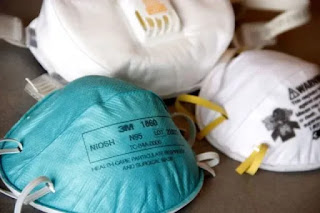
How to get N95 Masks in India - कैसे पाएं मास्क? Yellow, White, Blue or Black ?

कैसे पाएं मास्क? पीला, सफेद, नीला या काला? There are many colors of masks available in India of different colors. What is the difference ? W...