Showing posts with label 3d. Show all posts

Sunday, June 28, 2015

How to make a 360 degree (look all around) youtube video with a single camera ?

Youtube released a feature for 360 degree videos in March this year and slowly a few good videos have been uploaded in 360 degree views. These typically are made with a multi-camera setup like the ones listed by youtube itself.  Bublcam, Giroptic’s 360cam, IC Real Tech’s Allie, Kodak’s SP360 and RICOH THETA are 360-degree video cameras compatible with YouTube.


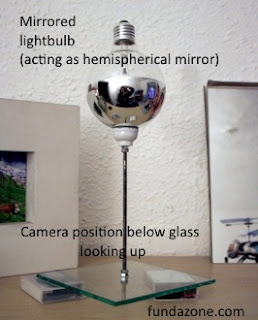
Of course, 360 degree videos have been tried out by a few people for maybe around five years, with a certain HackADay reader in 2010(5 years ago) sending in a homemade hack to make a 360 degree video using a single camera and a mirrored hemisphere(from a lightbulb).
These videos have only horizontal panning, means, you can go side to side in all 360 degrees, but not up and down.
But that's ok for a dirt cheap option to make 360 degree videos.

Google had initially made 360 degree (or Spherical) videos playable only on Youtube andoid app and Chrome browser. But now, they have announced support for iOS 8 and above too.

How to make a 360 degree video with a single camera ?

Using a hemispherical mirror.

By using a hemispherical mirrored surface like a mirrored lightbulb, you can capture a doughnut video(or photo) as shown here.


Monday, May 25, 2015

How to make Red-Blue 3D anaglyphs and watch 3D movies on your plain old computer

3D vision or stereopsis is something that is very interesting for someone working on human vision.
It is the ability of the brain to merge the images received from the left and right eyes into a single image and to get additional information about the distance of everything in the combined field of view from the observation point.

T-rex in Red-Cyan Anaglyph by YellowishHaze on Deviant art


It not only requires two working eyes, but also that the young brain should have learnt to process this information in the first year of life. If one does not develop good binocular vision in early childhood, they may not develop stereopsis, even if vision is improved later in life.

To view 3D images on a 2 dimensional display medium like a printed paper or a standard(non 3D) TV or computer or mobile screen, they are quite a few methods.

One of those is stereograms, which require some effort and practice to see.

Another common method is Anaglyph glasses - the most common of which is Red-Blue or Red-Cyan coloured glasses. In fact, most of the freely available Anaglyph content now is in this color.

The problem with Anaglyph 3D is that the colors are badly reproduced. Dubois method

Another 3d red-cyan anaglyph in Dubois Color mode

One of the greats in this field is Eric Dubois, whose methods have been incorporated in many Anaglyph producing and displaying softwares.

Anaglyph videos are available in youtube.
In fact, if you there is a filter option in youtube for 3D, where images for left and right eye are uploaded in the same video, so that youtube can display the video in any method of 3D viewing that you want. So, if you have a 3D capable TV or monitor, you can use that for the best experience.
Or use mirror 3D for best color experience even though it is uncomfortable.

https://www.youtube.com/results?lclk=3d&search_query=3d&filters=3d

Of course, you will need 3d glasses to see the anaglyphs.

Buy Real 3D PLR1 Video Glasses from Flipkart.com
Buy Hrinkar Anaglyph Plastic Updated Version 2015 Video Glasses
DOMO nHance RB560P Anaglyph Passive Red and Blue 3D Video Glasses
You can even get clip-on 3D glasses to wear on top of your regular prescription spectacles


Once you get the glasses, you can start making your own 3D anaglyph phots and videos.

Here's a FREE 3D making software to get you started.

Stereo Photomaker

StereoPhoto Maker(SPM) functions as a versatile stereo image editor \ viewer and can automatically batch-align hundreds of images and mount them to the 'window'.

It may be run on all versions of Windows and PowerPC and Intel Macs
Download here for FREE

How to get N95 Masks in India - कैसे पाएं मास्क? Yellow, White, Blue or Black ?

कैसे पाएं मास्क? पीला, सफेद, नीला या काला? There are many colors of masks available in India of different colors. What is the difference ? W...