Showing posts with label youtube. Show all posts

Sunday, June 28, 2015

How to make a 360 degree (look all around) youtube video with a single camera ?

Youtube released a feature for 360 degree videos in March this year and slowly a few good videos have been uploaded in 360 degree views. These typically are made with a multi-camera setup like the ones listed by youtube itself.  Bublcam, Giroptic’s 360cam, IC Real Tech’s Allie, Kodak’s SP360 and RICOH THETA are 360-degree video cameras compatible with YouTube.


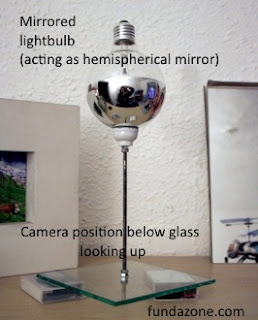
Of course, 360 degree videos have been tried out by a few people for maybe around five years, with a certain HackADay reader in 2010(5 years ago) sending in a homemade hack to make a 360 degree video using a single camera and a mirrored hemisphere(from a lightbulb).
These videos have only horizontal panning, means, you can go side to side in all 360 degrees, but not up and down.
But that's ok for a dirt cheap option to make 360 degree videos.

Google had initially made 360 degree (or Spherical) videos playable only on Youtube andoid app and Chrome browser. But now, they have announced support for iOS 8 and above too.

How to make a 360 degree video with a single camera ?

Using a hemispherical mirror.

By using a hemispherical mirrored surface like a mirrored lightbulb, you can capture a doughnut video(or photo) as shown here.


Watch these full 360 degree all around you videos on your mobile or computer

360° movie from the cockpit of a Swiss Air Force F-5 jet with the team "Patrouille Suisse" flying over the Swiss Alps. Pilot is sitting in the front seat of the plane


Update : learn how to make these 360 degree videos yourself !

  • When playing the video on an android phone or tablet, just move the phone around you to see in different perspectives. It uses the accelerometers of your mobile to show you what is happening where.
  • On a computer(on Chrome), just click and drag on the video to change the orientation and see in different directions.
You will have to watch each video a few times to get all the action happening everywhere.


AVICII LYRICS
"Waiting For Love"
(with Martin Garrix & John Legend)

Where there's a will, there's a way, kinda beautiful
And every night has its day, so magical
And if there's love in this life, there's no obstacle
That can't be defeated

For every tyrant a tear for the vulnerable
In every lost soul the bones of a miracle
For every dreamer a dream we're unstoppable
With something to believe in

Monday left me broken
Tuesday I was through with hoping
Wednesday my empty arms were open
Thursday waiting for love, waiting for love
Thank the stars it's Friday
I'm burning like a fire gone wild on Saturday
Guess I won't be coming to church on Sunday
I'll be waiting for love, waiting for love
To come around

We are one of a kind irreplaceable
How did I get so blind and so cynical
If there's love in this life we're unstoppable
No we can't be defeated

Monday left me broken
Tuesday I was through with hoping
Wednesday my empty arms were open
Thursday waiting for love, waiting for love
Thank the stars it's Friday
I'm burning like a fire gone wild on Saturday
Guess I won't be coming to church on Sunday
I'll be waiting for love, waiting for love
To come around

Thursday, April 02, 2009

Opera browser introduces face gestures for lazy mouse potatoes who can't reach out and click their mouse


Introducing Opera Face Gestures

Photo: Roberto Mateu

Posted on April 1, 2009
by Roberto Mateu

At Opera we are always working on new ways to make your browsing faster. Eight years ago we introduced Mouse Gestures as a way to speed up your interaction with the browser and focus on what’s important: the content you’re looking at. We didn’t stop there, in 2005 we introduced Voice Navigation on the desktop and more recently we have worked with Nintendo to create a browser that takes full advantage of the “Wiimote” and later, the touchscreen in the DSi.

Looking ahead, we recognize the future importance of touch interfaces, but we believe that there is another input device that is already present in most new computers and it’s ready to enable a whole new way of user-interaction: the webcam.

Today we introduce Face Gestures, a revolutionary technology designed to make interacting with your browser easier and simpler on computers with cameras. Face Gestures lets you perform frequent browsing operations with natural and easy to make face gestures. By using an internal technology dubbed Face Observation Opera Language, we are able to recognize pre-determined facial expressions and match them to commands on the Opera browser.

You can try Face Gestures today by downloading the latest Opera 10 alpha snapshot or check out the video below to learn more.

Setting up Face Gestures

To enable Face Gestures press F8. You will hear a beeping sound as soon as Opera finishes calibrating your passive facial expression. Please don’t close your eyes, move your head or make any facial expressions while Face Gestures is calibrating.

Look at me

Among many others, the following gestures are currently included:

Initial stance
Relaxed expression
Back
Left wink
Forward
Right wink
New Tab
Double wink
Reload
Shake head
Go to Home Page
Roll eyes / Fake smile
Scroll Up
Raise eyebrows
Scroll Down
Frown eyebrows
Zoom In
Suck cheeks
Zoom Out
Puff cheeks
Bookmark Page
Lick up
Open Speed Dial
Waggle tongue

As always, we encourage all feedback and suggestions you may have. Please upload your gestures suggestions as a response to the above video in YouTube.

Security Considerations

No personal information or images are sent back to Opera when Face Gestures is enabled, so don’t worry about how you look.

Known Issues

As with any beta release there are some known issues with the current version of Face Gestures. Please read below before reporting a bug.

  • Beards and hair styles

    Face Gestures is compatible with most types of facial hair and haircuts. But if your face is covered with more than 25% of facial hair, recognition errors may occur. Please note that handlebars and goatees are compatible independently but if combined recognition will decrease. At the moment soul-patches crashes the browser and it refuses to relaunch, we are looking into this problem. Bushmen beards and emo haircuts are not supported.

  • Adult Web sites

    Users visiting Web sites that contain adult content sometimes make unconscious facial expressions. If Opera keeps opening Speed Dial and Zooming In and Out, please be aware that this not a bug. It may be useful to disable Face Gestures for a better experience. Also remember that wiping your cache is recommend after visiting untrusted websites.

  • Financial Web sites

    For compatibility reasons Face Gestures auto-detects financial news services and disables itself. The current version of the recognition software is unable to adapt fast enough to the sudden change in the users expression map. As soon as the new version is available you will be prompted to install stimulus_package.patch.

Download Opera 10 Alpha with Face Gestures or share your experience at My Opera.

Saturday, January 19, 2008

MacBook Air - see the advertisement

MacBook Air - see the advertisement

It's razor-thin and looks great and of course we all know that Apple is going to sell a gazillion of them. Yet another gadget from Apple - the company that brought us the iPod, iPhone, iMac and such stylish stuff.


Want to buy a Macbook ???

How to get N95 Masks in India - कैसे पाएं मास्क? Yellow, White, Blue or Black ?

कैसे पाएं मास्क? पीला, सफेद, नीला या काला? There are many colors of masks available in India of different colors. What is the difference ? W...