
Wednesday, July 26, 2006


Monday, July 17, 2006
The virus evolves !!!

The virus has evolved - just like a biological virus !!!
This is the latest scrap that I saw :
Oieee, all joia? I came here to deliver to a virtual card pra vc!
CLIQUE no link para ler seu cartão!!!
http://(suspicious link)
(Scrapped user's name - wow ! clever !)
Leia seu cartão e aproveite para saber como ganhar um MP3 player.
Tudo de Bom...
Still working out what this is and how to eliminate it ...
More later ... Follow the instructions on my previous posts for removing the virus.
How to remove the Orcu virus ...
REMOVAL
The following instructions pertain to all current and recent Symantec antivirus products, including the Symantec AntiVirus and Norton AntiVirus product lines.
- Disable System Restore (Windows Me/XP).
- Update the virus definitions.
- Run a full system scan.
- Delete any values added to the registry.
- Restore the security settings in Internet Explorer modified by the threat.
1. To disable System Restore (Windows Me/XP)
If you are running Windows Me or Windows XP, we recommend that you temporarily turn off System Restore. Windows Me/XP uses this feature, which is enabled by default, to restore the files on your computer in case they become damaged. If a virus, worm, or Trojan infects a computer, System Restore may back up the virus, worm, or Trojan on the computer.
Windows prevents outside programs, including antivirus programs, from modifying System Restore. Therefore, antivirus programs or tools cannot remove threats in the System Restore folder. As a result, System Restore has the potential of restoring an infected file on your computer, even after you have cleaned the infected files from all the other locations.
Also, a virus scan may detect a threat in the System Restore folder even though you have removed the threat.
For instructions on how to turn off System Restore, read your Windows documentation, or one of the following articles:
- How to disable or enable Windows Me System Restore
- How to turn off or turn on Windows XP System Restore
Note: When you are completely finished with the removal procedure and are satisfied that the threat has been removed, reenable System Restore by following the instructions in the aforementioned documents.
For additional information, and an alternative to disabling Windows Me System Restore, see the Microsoft Knowledge Base article: Antivirus Tools Cannot Clean Infected Files in the _Restore Folder (Article ID: Q263455).
2. To update the virus definitions
Symantec Security Response fully tests all the virus definitions for quality assurance before they are posted to our servers. There are two ways to obtain the most recent virus definitions:
- Running LiveUpdate, which is the easiest way to obtain virus definitions:
- If you use Norton AntiVirus 2006, Symantec AntiVirus Corporate Edition 10.0, or newer products, LiveUpdate definitions are updated daily. These products include newer technology.
- If you use Norton AntiVirus 2005, Symantec AntiVirus Corporate Edition 9.0, or earlier products, LiveUpdate definitions are updated weekly. The exception is major outbreaks, when definitions are updated more often.
- Downloading the definitions using the Intelligent Updater: The Intelligent Updater virus definitions are posted daily. You should download the definitions from the Symantec Security Response Web site and manually install them. To determine whether definitions for this threat are available by the Intelligent Updater, refer to Virus Definitions (Intelligent Updater).
The latest Intelligent Updater virus definitions can be obtained here: Intelligent Updater virus definitions. For detailed instructions read the document: How to update virus definition files using the Intelligent Updater.
3. To run a full system scan
- Start your Symantec antivirus program and make sure that it is configured to scan all the files.
- For Norton AntiVirus consumer products: Read the document: How to configure Norton AntiVirus to scan all files.
- For Symantec AntiVirus Enterprise products: Read the document: How to verify that a Symantec Corporate antivirus product is set to scan all files.
- Run a full system scan.
- If any files are detected, follow the instructions displayed by your antivirus program.
Important: If you are unable to start your Symantec antivirus product or the product reports that it cannot delete a detected file, you may need to stop the risk from running in order to remove it. To do this, run the scan in Safe mode. For instructions, read the document, How to start the computer in Safe Mode. Once you have restarted in Safe mode, run the scan again.
After the files are deleted, restart the computer in Normal mode and proceed with the next section.
Warning messages may be displayed when the computer is restarted, since the threat may not be fully removed at this point. You can ignore these messages and click OK. These messages will not appear when the computer is restarted after the removal instructions have been fully completed. The messages displayed may be similar to the following:
Title: [FILE PATH]
Message body: Windows cannot find [FILE NAME]. Make sure you typed the name correctly, and then try again. To search for a file, click the Start button, and then click Search.
4. To delete the value from the registry
Important: Symantec strongly recommends that you back up the registry before making any changes to it. Incorrect changes to the registry can result in permanent data loss or corrupted files. Modify the specified subkeys only. For instructions refer to the document: How to make a backup of the Windows registry.
- Click Start > Run.
- Type regedit
- Click OK.
Note: If the registry editor fails to open the threat may have modified the registry to prevent access to the registry editor. Security Response has developed a tool to resolve this problem. Download and run this tool, and then continue with the removal.
- Navigate to the subkey:
HKEY_LOCAL_MACHINE\SOFTWARE\Microsoft\Windows\CurrentVersion\Run
- In the right pane, delete the value:
"WinZip" = "%System%\wzip32.exe"
- Navigate to and delete the subkey:
HKEY_CLASSES_ROOT\CLSID\{FCADDC14-BD46-408A-9842-CDBE1C6D37EB}
- Exit the Registry Editor.
- Click Start > Settings > Control Panel
- Select Internet Options
- Select the Advanced tab
- Scroll down to Security
- Uncheck Allow software to run or install even if the signature is invalid
- Check Check for signatures on dowloaded programs
- Click Apply
- Click OK
- Exit the Control Panel
Further details for the technically inclined
Infostealer.Orcu
Risk Level 1: Very Low
Discovered: June 20, 2006
Updated: June 21, 2006 11:54:54 AM ZE9
Type: Trojan Horse
Systems Affected: Windows 2000, Windows 95, Windows 98, Windows Me, Windows NT, Windows Server 2003, Windows XP
SUMMARY
Infostealer.Orcu is a Trojan horse that attempts to steal confidential information, such as bank and Paypal accounts. It may arrive as a message spammed across the Orkut network.
Protection
- Virus Definitions (LiveUpdate™ Daily) June 21, 2006
- Virus Definitions (LiveUpdate™ Weekly) June 21, 2006
- Virus Definitions (Intelligent Updater) June 21, 2006
- Virus Definitions (LiveUpdate™ Plus) June 21, 2006
Threat Assesment
Wild
- Wild Level: Low
- Number of Infections: 0 - 49
- Number of Sites: 0 - 2
- Geographical Distribution: Low
- Threat Containment: Easy
- Removal: Moderate
Damage
- Damage Level: Low
- Payload: Downloads additional malware.
- Releases Confidential Info: Gathers and sends out sensitive financial information.
Distribution
- Distribution Level: Low
TECHNICAL DETAILS
Orkut's users may receive a malicious link from other infected contacts. The Trojan posts a message in the user's scrapbook area of the Orkut system. The message text is chosen by the attacker and can be a random sentence written in Brazilian Portuguese, such as the following:
Message example 1:
Opa, tudo bom? Eu criei um video com uma selecao de minhas fotos novas, clica ai pra ver - [MALICIOUS_LINK] - Esta bem legais!!!
Message example 2:
Oi... tudo bom? Como o orkut limita a quantidade de fotos que podem ser publicadas na minha conta, eu criei um slide com algumas fotos minhas, pra ver e so clicar clicar no link!!! [MALICIOUS_LINK] - Sei que vai gostar
If users click on the link, a malicious file is downloaded, which is a copy of Infostealer.Orcu.
When Inforstealer.Orcu is executed, it performs the following actions:
- Copies itself as the following location:
%System%\wzip32.exe
Note: %System% is a variable that refers to the System folder. By default this is C:\Windows\System (Windows 95/98/Me), C:\Winnt\System32 (Windows NT/2000), or C:\Windows\System32 (Windows XP). - Adds the value:
"WinZip" = "%System%\wzip32.exe"
to the registry subkey:
HKEY_LOCAL_MACHINE\SOFTWARE\Microsoft\Windows\CurrentVersion\Run
so that it runs every time Windows starts. - Modifies the values:
"CheckExeSignatures" = "no"
"RunInvalidSignatures" = "1"
in the registry subkey:
HKEY_CURRENT_USER\Software\Microsoft\Internet Explorer\Download
so that Internet Explorer downloads files covertly. - Contacts the following URL to download and execute another threat:
[http://]www2.no.comunidades.net/sites/jo/joaosembraco/imagens/log[REMOVED] - Copies the above threat as the following files:
- %Temp%\tmp.dat
- %System%\winlogon_.jpg
- %System%\logo1.jpg
%System%\login.dll
Note: %Temp% is a variable that refers to the Windows temporary folder. By default, this is C:\Windows\TEMP (Windows 95/98/Me/XP) or C:\WINNT\Temp (Windows NT/2000).
- It may create the following folder:
%Windir%\htmCache
Note: %Windir% is a variable that refers to the Windows installation folder. By default, this is C:\Windows or C:\Winnt. - Registers the above files as a Browser Helper Object for Microsoft Internet Explorer and creates the following registry subkeys:
HKEY_LOCAL_MACHINE\SOFTWARE\Microsoft\Windows\CurrentVersion\Explorer\Browser Helper Objects\{FCADDC14-BD46-408A-9842-CDBE1C6D37EB}
HKEY_CLASSES_ROOT\CLSID\{FCADDC14-BD46-408A-9842-CDBE1C6D37EB}
- When Internet Explorer is executed, the BHO component shows the following message box:
- Monitors Internet Explorer windows and attempts to steal login information and passwords from the following Web sites:
- www2.bancobrasil.com.br
- www.bradesco.com.br
- www.caixa.gov.br
- internetcaixa.caixa.gov.br
- bankline.itau.com.br
- ibpf.unibanco.com.br
- empresarial.unibanco.com.br
- www2.realsecureweb.com.br
- www.equifax.com.br
- www.serarsa.com.br
- www.nossacaixa.com.br
- pf01.suadmeris.com.br
- www.safra.com.br
- www.paypal.com
- www.orkut.com
- www.itaucard.com
- Gathers the following information about the compromised computer:
- MAC address
- Serial number of hard drive
- CPU type
- OS version and service pack
- Stores the gathered information in the following file:
C:\cpu.log - May end the following security-related processes:
- NPFMntor
- ASHSERV.EXE
- ASWUPDSV.EXE
- ASHWEBSV.EXE
- ASHMAISV.EXE
- ASHDISP.EXE
- AVGCC.EXE
- AVGUPSVC.EXE
- AVGAMSVR.EXE
- Sends back the gathered accounts and information using the following legitimate domain:
submit.mailmyform.com

Recommendations
Symantec Security Response encourages all users and administrators to adhere to the following basic security "best practices":
- Turn off and remove unneeded services. By default, many operating systems install auxiliary services that are not critical, such as an FTP server, telnet, and a Web server. These services are avenues of attack. If they are removed, blended threats have less avenues of attack and you have fewer services to maintain through patch updates.
- If a blended threat exploits one or more network services, disable, or block access to, those services until a patch is applied.
- Always keep your patch levels up-to-date, especially on computers that host public services and are accessible through the firewall, such as HTTP, FTP, mail, and DNS services (for example, all Windows-based computers should have the current Service Pack installed.). Additionally, please apply any security updates that are mentioned in this writeup, in trusted Security Bulletins, or on vendor Web sites.
- Enforce a password policy. Complex passwords make it difficult to crack password files on compromised computers. This helps to prevent or limit damage when a computer is compromised.
- Configure your email server to block or remove email that contains file attachments that are commonly used to spread viruses, such as .vbs, .bat, .exe, .pif and .scr files.
- Isolate infected computers quickly to prevent further compromising your organization. Perform a forensic analysis and restore the computers using trusted media.
- Train employees not to open attachments unless they are expecting them. Also, do not execute software that is downloaded from the Internet unless it has been scanned for viruses. Simply visiting a compromised Web site can cause infection if certain browser vulnerabilities are not patched.
Further details ...
Just like a biological virus, the infostealer virus has evolved ...
Take a look at this :
Infostealer.Orcu is a Trojan horse that attempts to steal confidential information, such as bank and Paypal accounts. It may arrive as a message spammed across the Orkut network.
Take a look at this :
Discovered: June 20, 2006
Updated: June 21, 2006 11:54:54 AM ZE9
Type: Trojan Horse
Systems Affected: Windows 2000, Windows 95, Windows 98, Windows Me, Windows NT, Windows Server 2003, Windows XP
Infostealer.Orcu is a Trojan horse that attempts to steal confidential information, such as bank and Paypal accounts. It may arrive as a message spammed across the Orkut network.
Protection
- Virus Definitions (LiveUpdate™ Daily) June 21, 2006
- Virus Definitions (LiveUpdate™ Weekly) June 21, 2006
- Virus Definitions (Intelligent Updater) June 21, 2006
- Virus Definitions (LiveUpdate™ Plus) June 21, 2006
Threat Assesment
Wild
- Wild Level: Low
- Number of Infections: 0 - 49
- Number of Sites: 0 - 2
- Geographical Distribution: Low
- Threat Containment: Easy
- Removal: Moderate
Damage
- Damage Level: Low
- Payload: Downloads additional malware.
- Releases Confidential Info: Gathers and sends out sensitive financial information.
Distribution
- Distribution Level: Low
Writeup By: Elia Florio
Sunday, July 16, 2006
The Orkut virus - Infostealer.Orcu

Orkut has become a major social networking portal . It is so cool and so addictive ... But there are hidden dangers everywhere . . .
Recently u might have noticed that the hyperlinking feature has been modified . . . That was done to prevent phishing ( hackers stealing ur data - Just use the google search on my sidebar to read up on it )
A recent virus attack was by Infostealer.Orcu
Here is how the scrap will look like.
“Opa, tudo bom? Eu criei um vídeo com uma seleção de minhas fotos
novas, clica aí pra ver - h t t p :// y e p . i t / ? i k s t t v -
Estão
bem legais!!! “
What should you do?
Simply delete the scrap! As simple as that..
How does it spread?
It spreads through infected contacts. An orkut account gets infected
once you click on the link. The Trojan posts a message in your all your
friend's scrapbook area of the Orkut system. The message text is chosen
by the attacker and can be a random sentence written in Brazilian
Portuguese, such as the following:
Message example 1:
Opa, tudo bom? Eu criei um video com uma selecao de minhas fotos novas,
clica ai pra ver - ( suspicious link ) - Esta bem legais!!!
Message example 2:
Oi... tudo bom? Como o orkut limita a quantidade de fotos que podem ser
publicadas na minha conta, eu criei um slide com algumas fotos minhas,
pra ver e so clicar clicar no link!!! ( suspicious link ) - Sei que vai
gostar
If anyone click on the link, it redirects u to the virus URL & asks u to download an .exe file , which is a
copy of Infostealer.Orcu.
When Inforstealer.Orcu runs on a computer, it infects the computer u use and uses your orkut account to scrap everyone in your friends list with the malicious scrap, starting from the first name that comes when u view freinds (at that particular time - the list order changes after some time )
The message is in Portuguese and means :
Opa, all good one? I created a video with an collection of my photos new,click for to see there -( suspicious link ) - I am well legal!
Name of the Trojan:Recently u might have noticed that the hyperlinking feature has been modified . . . That was done to prevent phishing ( hackers stealing ur data - Just use the google search on my sidebar to read up on it )
A recent virus attack was by Infostealer.Orcu
Here is how the scrap will look like.
“Opa, tudo bom? Eu criei um vídeo com uma seleção de minhas fotos
novas, clica aí pra ver - h t t p :// y e p . i t / ? i k s t t v -
Estão
bem legais!!! “
What should you do?
Simply delete the scrap! As simple as that..
How does it spread?
It spreads through infected contacts. An orkut account gets infected
once you click on the link. The Trojan posts a message in your all your
friend's scrapbook area of the Orkut system. The message text is chosen
by the attacker and can be a random sentence written in Brazilian
Portuguese, such as the following:
Message example 1:
Opa, tudo bom? Eu criei um video com uma selecao de minhas fotos novas,
clica ai pra ver - ( suspicious link ) - Esta bem legais!!!
Message example 2:
Oi... tudo bom? Como o orkut limita a quantidade de fotos que podem ser
publicadas na minha conta, eu criei um slide com algumas fotos minhas,
pra ver e so clicar clicar no link!!! ( suspicious link ) - Sei que vai
gostar
If anyone click on the link, it redirects u to the virus URL & asks u to download an .exe file , which is a
copy of Infostealer.Orcu.
When Inforstealer.Orcu runs on a computer, it infects the computer u use and uses your orkut account to scrap everyone in your friends list with the malicious scrap, starting from the first name that comes when u view freinds (at that particular time - the list order changes after some time )
The message is in Portuguese and means :
Opa, all good one? I created a video with an collection of my photos new,click for to see there -( suspicious link ) - I am well legal!
Infostealer.Orcu
Norton’s Description:
Infostealer.Orcu is a Trojan horse that attempts
to steal confidential information, such as bank and Paypal accounts. It
may arrive as a message spammed across the Orkut network.
Systems Affected:
Windows 2000, Windows 95, Windows 98, Windows Me,
Windows NT, Windows Server 2003, Windows XP
Don't click on any strange links in ur scrapbook ... especially if it asks u to download or run some file
Tuesday, July 04, 2006
Lock up your slippers
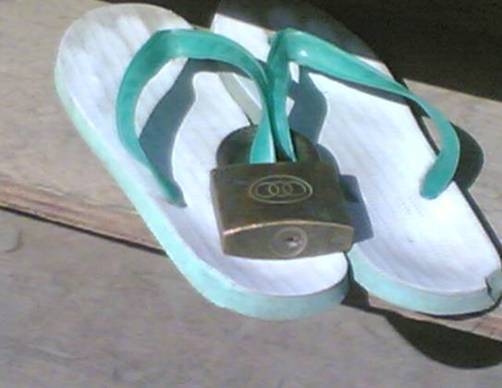
Ever lost ur shoes or slippers or sandals or any other kind of footwear while u left it outside somewhere. Now here's the solution to that problem. Just lock them up - yes lock them up !
As this interesting picture shows ( please note that those are not my slippers nor am I the photographer ), u just have to lock the two slippers together by a good lock.
U may wonder about the effectiveness of such a strategy. Yes, I wondered too... If they slippers are not locked to anything immobile, then what guarantee is there that they will stay there...
Then I realized, what stupid thief would carry off the tied slippers anyway ! Not only would he/she (for gender equality - nothing else) find it difficult to use them. And even if they want to steal it, I suppose they usually wear it and go...
So once again a funda that I think is absolutely crazy and idiotic... What do u think ?
Thursday, June 22, 2006
The case of the colour blind monitor

One fine day (I didn't know about the weather at the time - was inside and online for quite some time), I was calmly browsing and blogging away when I saw it ... (that's called an ellipsis , the 3 dots)
A computer screen which looked unique - different - one of kind. There was something about the way it looked (or rather showed) that caught the eye ... It took a few seconds (guess that less than 60 is few..(now that's not an ellipsis-that's just 2 dots-small things make a big difference)) to figure out that it was missing a color - Red. Almost saying - Gimme red !
Then I remembered....
Flashback
Anatomy class ... having a prized LCD projector , the department finally wanted to show a powerpoint (like xerox became a term for photocopy, powerpoint for presentation)...
Topic : Genetics ...
It was only halfway through the class that people realised that the projector was not showing its true colours. And then when we reached inheritance of colour blindness (color blindness for short - US spellings are shorter I guess- refer earlier post about partiality of Google). The teacher, who by now had realized that we were seeing the ppt without the red, joked that the projector must be having color blindness(there, short n sweet).
After class, I lingered back to examine it and discovered the defect - diagnosis: a broken pin. If I put in a small metal wire, maybe it could see again...
Quickly, I shut down the computer (quickly shut down - an oxymoron) . I pulled the monitor's plug and examined the pins - strangely everything was nomal ( two different problems can have the same outcome ) ... I was trying to break my head over the problem when I thought - maybe the other end of the cable...
Quickly (now truly) , I pulled out the other end from the monitor (usually it's fused to the monitor - a fact that I luckily forgot at the time (this was an LCD monitor in which the other end was detachable)) and examined it. ... ... ... nothing - everything normal ...
Sometimes, u feel frustrated when there is nothing worng ... u kind of feel that everything being right is kind of wrong... Dejected, I plugged in the cable and booted the comp. What do u know - the full colors were back !
Micro flashback
When I was pulling out the second end of the cable , I had noted that it was not screwed on tight.Sometimes, u do things right even without ur knowledge...
Friday, June 09, 2006
The Gmail Mystery !

My life has changed since I got Gmail. I mean with 2.5 GB+ of space , it should change the way u store your email ! Upload infinite number of essential files and software to the mailbox and access anywhere.
But recently, I came to see that several new features were made available to my friends' Gmails, but not to mine. Like chat ! And calendar ! And photo ! And web clips ! And more ... (actually I ran out of things to say)
I sent an email to gmail saying I haven't received these things yet ! I received a polite reply (obviously looked computer generated - there must have been googols of people out there who wanted equality who would have asked) saying that it will be activated in phases. I resigned to the fact that they didn't care about me even though I use my gmail properly like a valued customer should.
It was later (that is today to be precise) that I finally got a message from a friend advising me to change the photo which had seemingly been selected by me(that's what the server told him, he said) for my Gmail account ( it was a monkey, if u'd like to know, and must have been done by the gmail server which had been making a monkey out of me)
Click ! Revelation struck ! It said that this option was available only to English (US) users !!!!
Huh ! Since I had chosen English (UK) I cpould not get these features !!! If I can manage with British English I definitely can manage US English too !!! As the basic funda of the problem entered into my brain, I rapidly went through the vaious clicks to reach the Holy Grail - the language option in the settings page. Click, Click, Click ! It was all over within seconds (quite a few seconds, slow net connection !) And then the transformation began !!!
The transformation was unlike any I'd seen before (duh !) .
Then I finally got what I'd wanted in Gmail. End of story !
Thursday, June 08, 2006
A video of the candle light protest Taken by Me !!!
A view of the circle of candle light taken from the top of Lister Annexe. You cannot see the students and residents but you can see the light they hold, as they disperse from the circle formation to fix the candles on a square platform. Anti-reservation protest.
Wednesday, May 17, 2006
Say no to reservation
The policy of the politicians to divide and rule to gain votes is clearly brought out through the reservation quota being increased to a staggering 49.5%. This is definitely cutting off the seats available to normal people born into a socially disadvantaged non-reserved class. One must realize that the Open Category seats allow everyone – SC, ST, OBC, anyone – to gain admission based on their merit. There is a myth in many minds that removing or reducing reservation means that doors are closed to the ‘backward’ classes. It only opens the door wider to include the now disadvantaged non-reserved class. The perfect strategy is to reserve seats in coaching institutions for ‘backward’ classes so that they can develop the merit themselves and compete like the rest of the country to gain their rightful place. Remember – Give a man a fish, and he’ll eat for a day and maybe beg for free fish everyday. But teach a man to fish and he can fish to earn his living. Provide coaching at primary school level , develop the skill and let everyone compete at an equal level.
Free SMS worldwide
Free SMS worldwide
Subscribe to:
Posts (Atom)
How to get N95 Masks in India - कैसे पाएं मास्क? Yellow, White, Blue or Black ?
कैसे पाएं मास्क? पीला, सफेद, नीला या काला? There are many colors of masks available in India of different colors. What is the difference ? W...
-
 The differentiation between a dragon and a wyvern in Western mythology is that a dragon has six limbs (four legs and two wings) whereas a w...
